
Notes that grow together.

Loam is a Markdown notes app for every device you own. Write in plain text that formats as you type. With Loam Pro, share a note and edit it together in the desktop and web apps, and let AI agents help, with a checkpoint before they change anything.

Free on one device. Pro is US$2.99 a month.

Rooftop weather station

#projects/weather-station

Log temperature, humidity and wind from the studio roof and push a reading every five minutes. Keep the sensor under the radiation shield.

Readings

  • Mount the radiation shield
  • Calibrate the anemometer

14:05, 18.4 °C, 71 % humidity, wind 9 km/h NW

JPJoon is editing Your agent edited this note. Checkpoint saved.

Plain text that formats as you type.

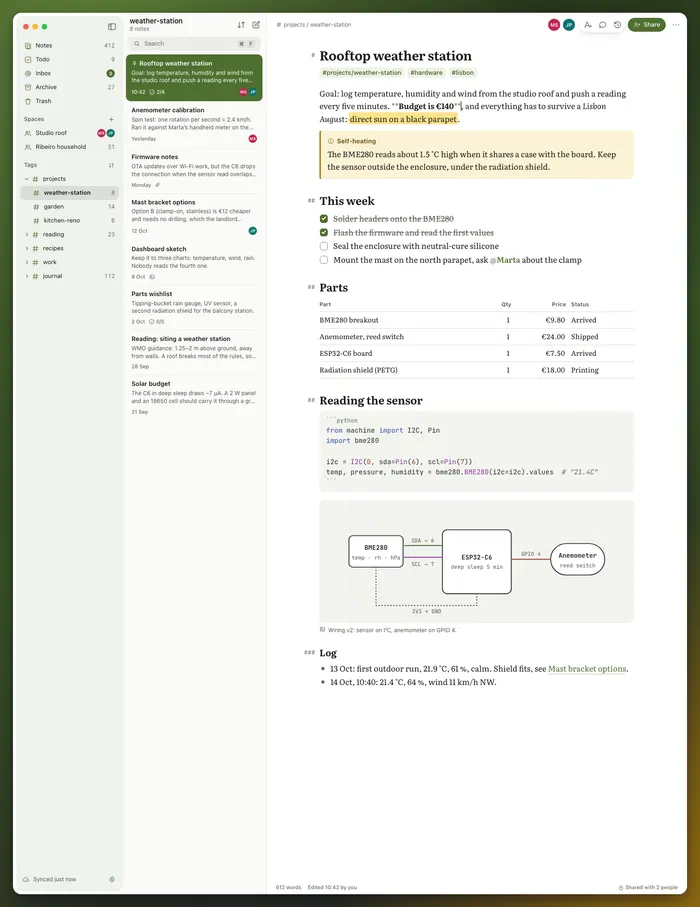
Type ## and the line becomes a heading, with the marker moved into the margin so every line keeps one left edge. Bold, links, tasks, tables, callouts, images, code and diagrams render in place, and the file underneath stays standard Markdown.

  • Folders and subfolders, and tags nested like #projects/garden
  • Links between notes with [[double brackets]]
  • Search inside every note’s text
  • A formatting toolbar on every device
  • Callouts, maths, footnotes and colour highlights
  • Code coloured for more than 140 languages
  • YouTube videos that load only when you click them
  • 22 themes, including high-contrast and true black
More about the editor
A full note in Loam: title, tags, a warning callout, a task list, a parts table, Python code and a wiring diagram.

Edit together, in real time.

Invite people to a note or a whole folder and choose whether each can edit, comment or only read. In the desktop app and the web app you see each other’s cursors as you type, talk it through in comments and can restore any earlier version. On any device you can @mention someone to let them know.

  • Live cursors and presence in the desktop and web apps
  • Shared folders, including notes you add later (needs Loam Pro)
  • Comments, replies and @mentions
  • Version history with named versions: 7 days on Free, all of it on Pro
  • Publish a note as a clean web page (needs Loam Pro)
More about collaboration

Let AI agents help, with you in charge.

Loam includes an MCP server, so AI apps that support the Model Context Protocol can search, read, write and organise your notes, but only after you approve them. Agent access needs Loam Pro.

  • You approve what each app asks for: read, write, or manage sharing
  • Agent edits appear live, labelled as an agent’s edit
  • A checkpoint is saved before an agent edits, so you can roll back
  • AI apps connected over MCP can move notes to the trash, never delete them for good
  • See and disconnect every connected app, on any device
Server addresshttps://mcp.loamnotes.app/mcp

At home on every device.

Loam has native apps for Mac, Linux, iPhone, iPad and Android, each following its platform’s conventions, plus a web app at app.loamnotes.app that works in any modern browser, with the same editor everywhere.

Open the web app
  • Mac Menu bar commands and a shortcut for everything
  • Linux AppImage, .deb and .rpm, with built-in updates
  • iPhone Widgets, Siri and Shortcuts, the Share sheet
  • iPad Split View and keyboard shortcuts
  • Android Phones and tablets, with a format bar above the keyboard
  • Web Any modern browser, at app.loamnotes.app

Your notes stay yours.

Every note is standard Markdown with GitHub-style tables and task lists, not a proprietary format.

  • Export every note as Markdown
  • Sign in with a passkey, or email and password
# Rooftop weather station
#projects/weather-station

Log temperature, humidity and wind
from the studio roof and push a reading
every **five minutes**.

## Readings
- [x] Mount the radiation shield
- [x] Calibrate the anemometer
The note from the top of this page, as it’s stored.

Simple pricing.

Free on one device, for as long as you like. Pro brings your notes everywhere and lets you share them.

Billing period

Free

Everything you need to write on one device.

US$0

No card needed.

  • The full Markdown editor
  • Folders, tags, links and search
  • All 22 editor themes
  • One device
Download

Pro

For your notes on every device, shared with people and agents.

US$29.99a yearUS$2.99a month

US$2.50 a month, billed yearly.Or US$29.99 a year and save 16%.

  • Everything in Free
  • Sync across all your devices
  • Share notes and folders with people
  • Real-time editing and comments in the desktop and web apps
  • Full version history in the desktop and web apps
  • AI agents over MCP
  • Publish notes to the web
Get Pro in the app

Pro starts with a 14-day free trial. Subscribe from Settings in any Loam app.

Prices in US dollars. App Store and Google Play may show local prices and taxes. Pro renews until you cancel.

Questions

Is Loam free?

Yes, on one device. The editor, folders, tags, links and search are free with no time limit. Pro adds sync, collaboration, shared folders, full version history, AI agents and publishing. Every theme is free.

Does Loam have folders?

Yes. Put notes in folders and subfolders, and add #tags inside notes as well. Folders are free. Sharing a folder needs Loam Pro on the owner's account, and gives each person their role on every note in it.

Are my notes really Markdown?

Yes. Every note is standard Markdown with GitHub-style tables and task lists, so nothing is locked into a private format.

What can I write in a Loam note?

Headings, bold, italic, underline, strikethrough, highlights, links, lists, todos, quotes, GitHub-style tables, callouts, footnotes, maths, code blocks coloured for their language, Mermaid diagrams, images, YouTube video cards, links between notes, #tags and @mentions. It all formats as you type and is saved as plain Markdown.

Can I add images or attach files?

You can add a picture that's already online by its web address, with a description for screen readers. Loam doesn't upload image files or store attachments yet.

What is MCP?

The Model Context Protocol is an open standard that lets AI apps use tools and data from other services. Loam's MCP server lets an AI app you approve work with your notes.

Which devices does Loam run on?

Mac and Linux computers, and iPhone, iPad and Android phones and tablets.

Can I cancel Pro?

Yes, any time: in the App Store or Google Play, or from your receipt email if you subscribed on the web. Pro stays on until the end of the period you paid for.

Start writing.

Free on one device. No card needed.

Download